Hi,I am V K Bibin ME, from CADPOINT Authorized Training Center Marthandam. I am happy to write an article about AutoCAD for Civil Engineering students in my view. Here I expressed about the need of AutoCAD for Civil Engineering and I hope this will be useful to all Civil students.
What is CAD ?
“COMPUTER AIDED DESIGNING & DRAFTING”
CAD helps to create,modify,analyze or optimize designs with the use of computers.CAD software is used to enhance the quality of design and increase the productivity of the designers.It makes communication through documentation.
AutoCAD
AutoCAD is a commercial CAD software application,developed & marketed by Autodesk. First release of AutoCAD Autodesk was in December,1982.The latest version of Autodesk AutoCAD 2022 is released on March 24, 2021.
Why AutoCAD?
In the past days,Architects and Engineers created their designs manually by using pen & paper,craft work etc.. If they want to change or edit their design, it was difficult & took more time, otherwise they had to go for new design. Nowadays paper and pen had changed to computer designed software like Autodesk AutoCAD. With AutoCAD, Architects and Engineers computerize their own creative drawings and designs easily and quickly.This tool can easily change and manipulate designs virtually before approval drawings.Furthermore, AutoCAD helps in 2D/3D drawings. As people felt, it was impossible to construct marvelous multi-storied buildings in the past, AutoCAD makes it possible with innovative and impressive designs. Not only in the construction side, moreover this software put its footprint in machinery designs, automobile and aircraft sectors.
TOP Users of AutoCAD:
AutoCAD software supports a number of applications in different engineering streams.Such us
CIVIL Engineering Drafting Tool Architectural Planning ToolMechanical IndustryFashion Industry3D Printing
Benifits Of AutoCAD:
- Increase Productivity
- Create Documentation
- Data can Be saved
- Reduce design Errors
AutoCAD Software:
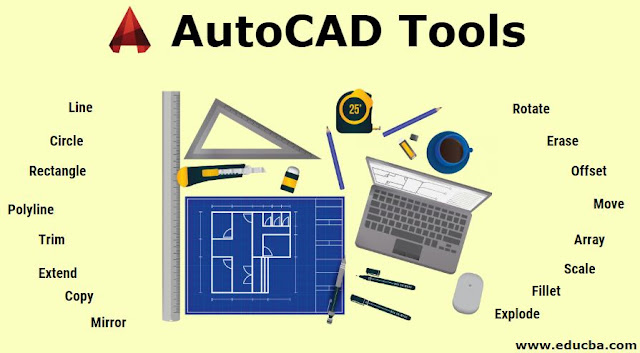
In Autodesk AutoCAD software various tools present to assist in drawing cretin the most basic types used are given in the below image:
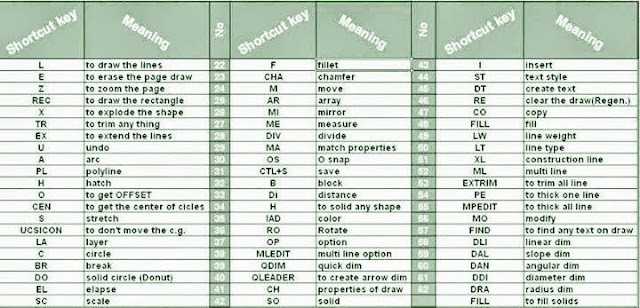
AutoCAD Tools Keys & Symbols are given Below image:
Civil Engineering:
Civil Engineering is one of the oldest and broadest professional Engineering discipline. It involves planning,constructing,maintenance, supervising etc..It includes all the essential constructions for modern life like highways,house planning,hospitals,malls,airports and other buildings.
AutoCAD Software for civil Engineering:
AutoCAD Software is mostly used by Civil engineering students for drafting. A civil drawing ,or site drawing , is the technical drawing that shows information about the building.These drawings are intended to give a clear picture of all information in a construction site to a civil a engineer.Here I am trying to explaining simple autocad drawing with complete building information(Plan,section,elevation,site plan,location plan,basic of vasthu,details of approval) for a house approval plan draw by a Civil Engineer from CADPOINT Authorized Training Center Marthandam.
In this software we use tools keys & symbols to draw a design below
Plan:
Plans are two dimensional diagrams. It is the top view of buildings. Plans are used by builders & constructors to construct buildings. Building plans are useful,when it comes to estimate the project cost and prepare project budgets.
Also watch the offical youtube channel from google has discussed related to this contendent. One such video is shared below:
Section:
Section refers to the view of structure. It cut the half plane of the building. Only horizontal cutting is allowed here.
Elevation:
Elevation is an orthographic projection of the exterior faces of buildings.The purpose of elevation drawing is to show the finished appearance of given side of the buildings & furnish vertical height dimensions.
Site Plan :
Site plan is the comprehensive detailed drawing of the building.To construct a building, the site plan is also required to show all the services connection like drainage,sower lines,water supply,electrical and communication cables.
Location Plan:
Location plan indicates the direction of North to make its orientation clear.
Location plan typically illustrate the following details
- Roads or building on adjoining land.
2. The site boundaries
3. Land necessary to carry out the proposed development.
4. Any other land owned by the developer that is close or adjacent to the site.
Details of Approval Diagram:
The complete details of building to submit the authority to get approval for that building..
I feel this article gives you a warm up about Autocad in Civil Engineering .If you find it useful please post your valuable comments in the comment window and share it to your friends …
See you in next post ..